for freelance editors and small studios with retainer clients
Get the script agreed before you open the timeline.
Each client’s Drive folder, release notes, help docs and past posts go in. A proposed angle and a script come out, with the source beside each line it can support and a clip range under each beat that has footage. Your client reads it on one link. You still make the cut.
Bulk edit, finally — feature video
Placeholder CRM · draft 2
- 1Picture: bulk-edit-walkthrough.mov0:03–0:11original in Google Drive
Words: Changing one field on four hundred contacts used to take an afternoon.
- 2Picture: bulk-edit-walkthrough.mov0:14–0:31original in Google Drivebulk-edit-review.pngstilloriginal in Google Drive
Words: Now you select them, change the field once, and review every change before it saves.
4 beats · 1 left openall four in Fig. 2
Reading Fig. 1
- Where a beat’s range starts in the client’s own recording.
- Opens the original file in their Google Drive.
- A screenshot they sent, shown as a still.
How the week changes
Less prep you were never paid for.
What you stop doing: the call to find out what the video is about, the scrub through their recordings for the shot, and the third round spent re-arguing the first.
A client week
Tinted: now. In red: what changes.
The brief
Today: A Drive folder, a one-line brief that says “keep it tight”, and a script you find in the edit.
With ReadyToEdit: The folder goes in. An angle comes back, then a script when you ask for one, with the source beside each line it can support.
The footage
Today: Their screen recordings, scrubbed end to end for the eight seconds that show the feature.
With ReadyToEdit: Each beat names the file and the range to use. A beat nothing they sent shows is left open.
The notes
Today: Notes by email, by text and on a call, merged by you into one list before you can start.
With ReadyToEdit: Change requests and rejected angles are recorded against the draft, each with a snapshot of the version it was about.
The sign-off
Today: The opening, approved in round one and un-approved in round three, with nothing to show what was agreed.
With ReadyToEdit: An approval stays with the exact draft it approved, so in round three you can open what was signed off.
The script, annotated
A script you can check against what the client sent.
Four beats of a client’s feature video. Five marks, and what each tells you before you cut.
Bulk edit, finally — feature video
Placeholder CRM · draft 2 · 4 beats
- their footage
- their documents
- a person’s call
- nothing placed
- the whole script
- Beat 1Picture: bulk-edit-walkthrough.mov0:03–0:11original in Google DriveWords:
Changing one field on four hundred contacts used to take an afternoon.
Their footage, their filename
Each beat with footage names the client’s own file and the range to use. Where the file came from Google Drive, the mark opens the original there.
- Beat 2Picture: bulk-edit-walkthrough.mov0:14–0:31original in Google Drivebulk-edit-review.pngstilloriginal in Google DriveWords:
“We don’t say ‘AI-powered’. Say what it does.” — the client, round 1
Struck from draft 1:
Our AI-powered bulk edit does the busywork for you.Now you select them, change the field once, and review every change before it saves.
Their correction, kept
The struck line stays on the record with draft 2, beside the note that asked for it, for whoever reopens it in round three.
- Beat 3Picture: undo-history.pngstilloriginal in Google DriveWords:
Anything you change can be undone for thirty days.cites release-notes-5.2.md
Why this source: it states the thirty-day window in the client’s own words.
Their release notes, cited
A line it can support names the file behind it and why that file was picked. A line it cannot support carries nothing, which tells you what to ask about.
- Beat 4Picture:
filter-then-select.mov0:02–0:09rejectedno clip placedWords:It works on any list you can filter.cites help/bulk-edit.md
No clip placed
The one suggestion, filter-then-select.mov, was rejected: it stops at the filter. Nothing else shows the edit, so the beat stays empty, here and on the client’s link.
- Beats & clipsWhole script
Changing one field on four hundred contacts used to take an afternoon. Now you select them, change the field once, and review every change before it saves. Anything you change can be undone for thirty days. It works on any list you can filter.
Whole script
The same lines read straight through, for a scratch VO or a client who only wants to read it.
What your client opens
The link your client opens needs no account.
- Any screen
- It opens in a browser, phone included, and each clip plays only its saved range.
- Download handoff
- The script, beats and clip ranges as one text file, to keep beside your timeline.
- Revoke or replace
- Switch the link off, or swap it for a new one when the draft moves on.
The link is for reading. Approving or requesting changes happens inside your workspace, where a client needs a reviewer seat.
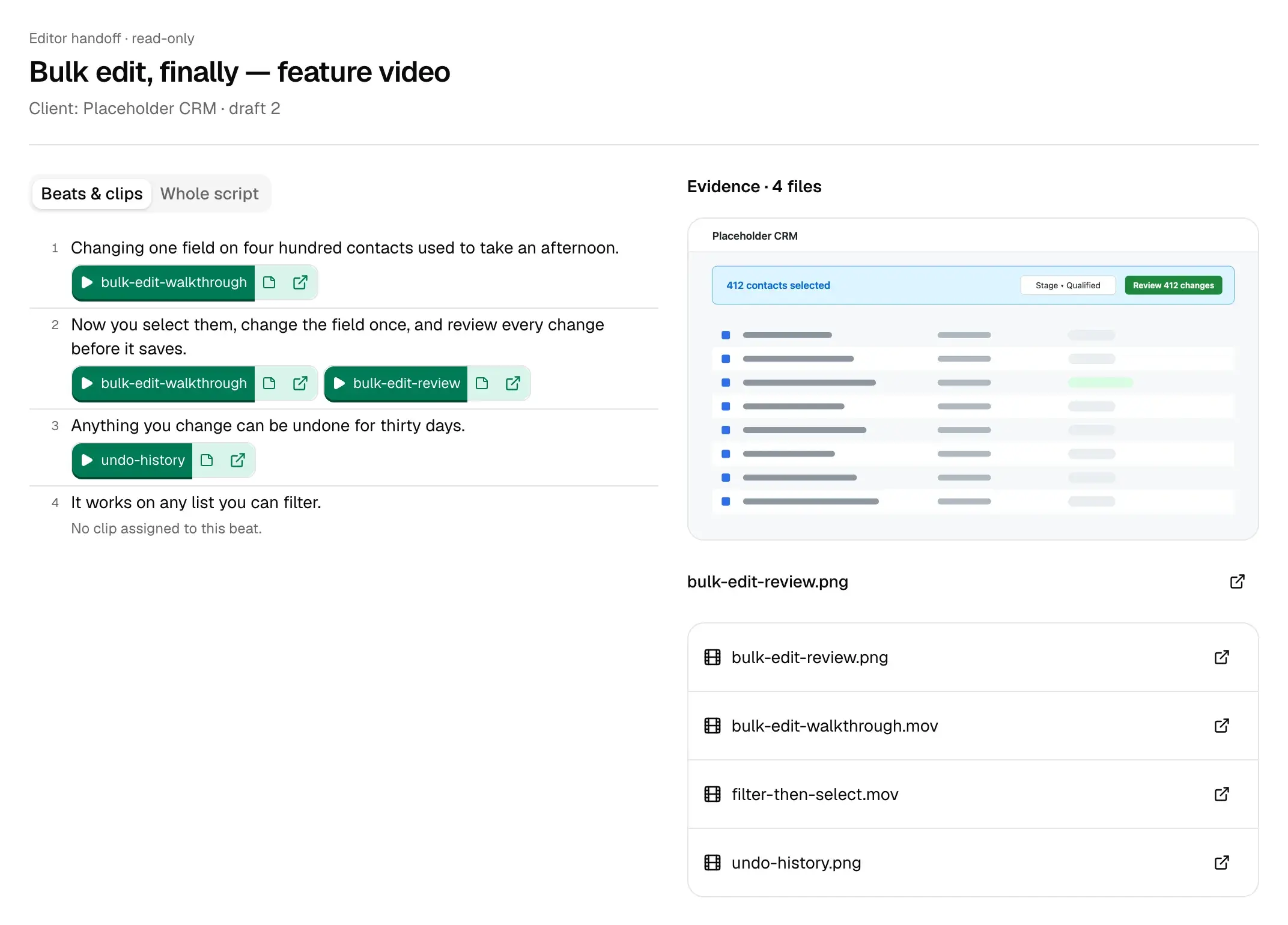
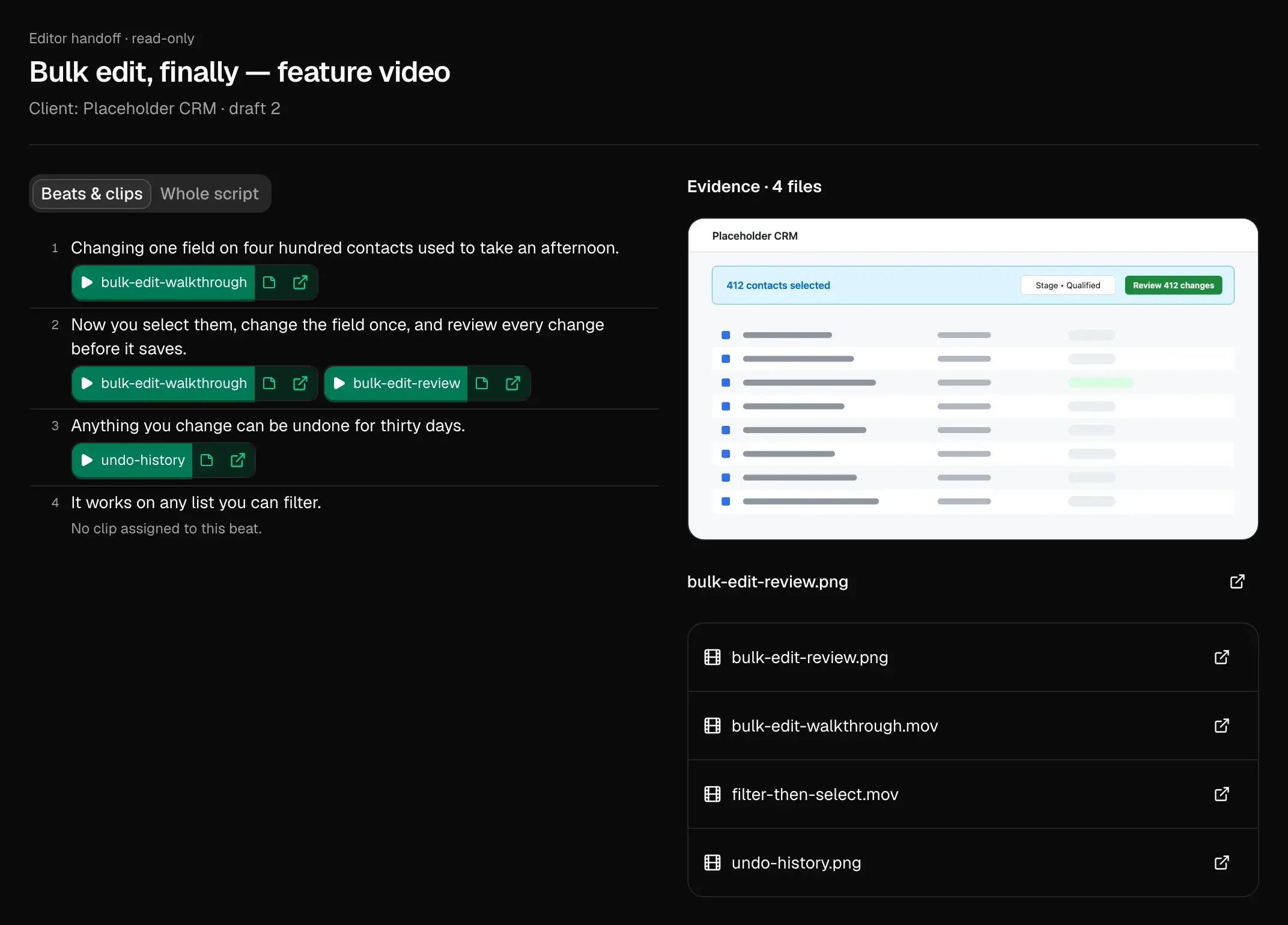
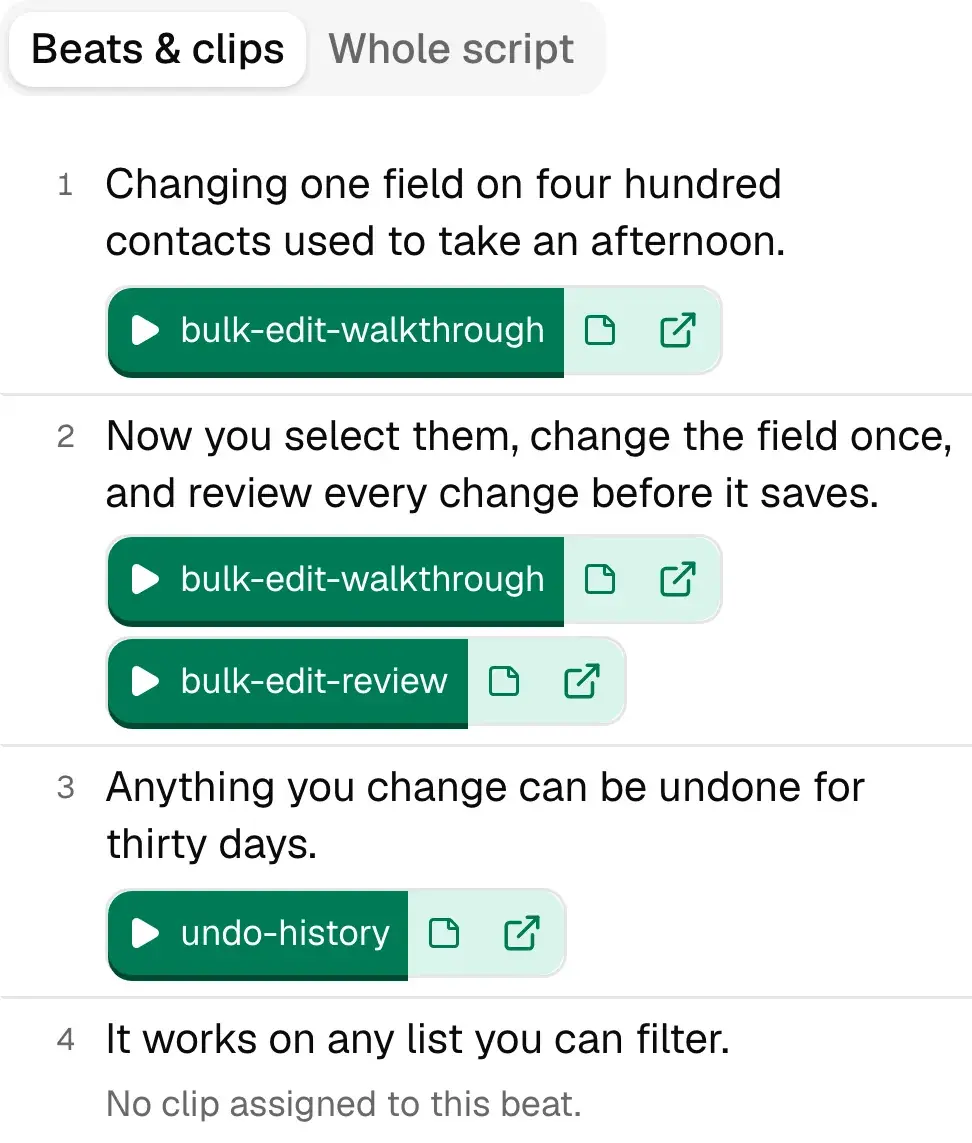
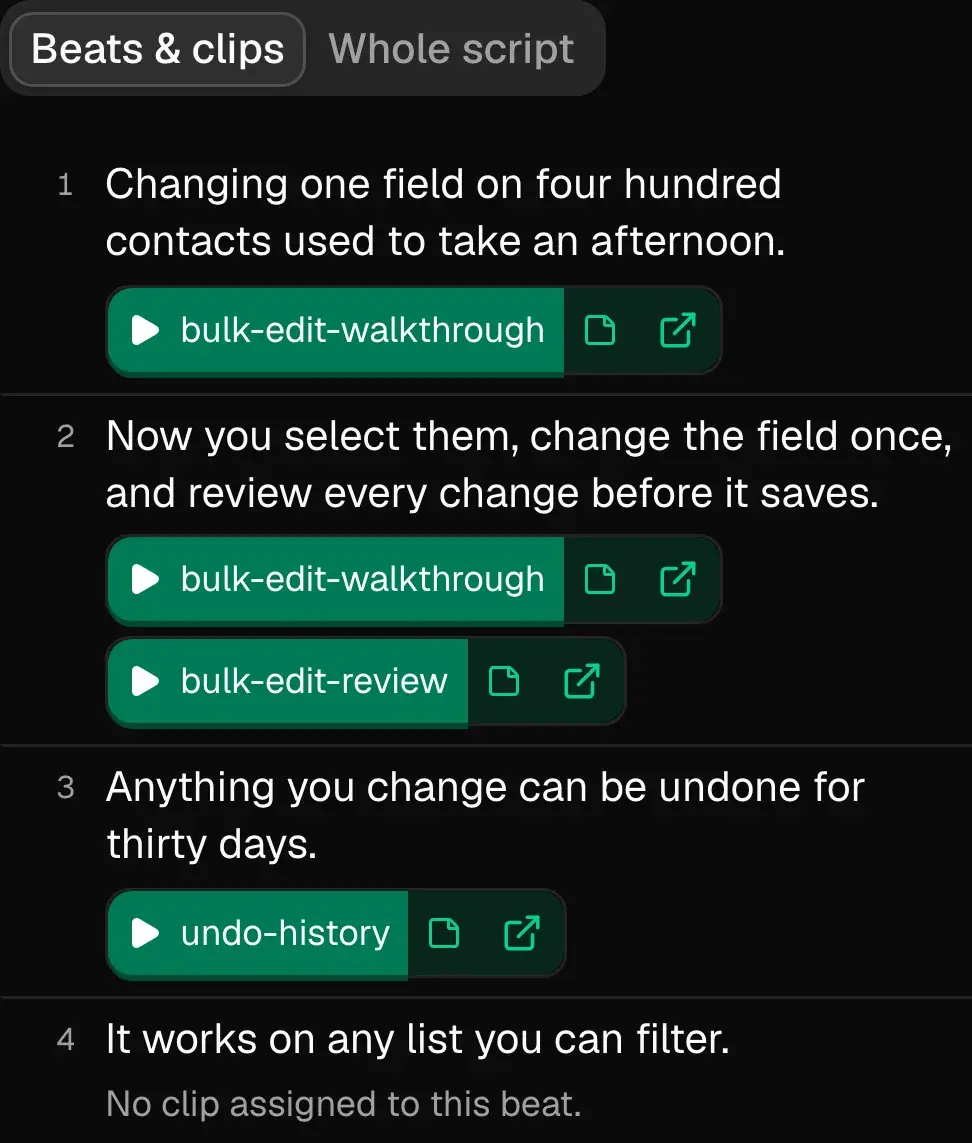
- 1“Whole script” reads the lines straight through; “Beats & clips” pairs each with its clips.
- 2Each clip button plays that beat’s saved range, or shows the still.
- 3Beat 4 has no clip, and says so.
An example handoff for a release video, from the client’s side: the page they would send you.
Read a finished handoffClients
Plans and pricesOne project per client.
| Client | What they sent | Angle proposed | Where it stands |
|---|---|---|---|
| Placeholder CRMSaaS, monthly feature videos |
| “Bulk edit, finally” | In review2026-09-18 |
| Ipsum PayrollSaaS, release videos |
| “Payday moved and nobody noticed” | Approved2026-09-17 |
| Dolor BookingB2B, a weekly YouTube show |
| “Why reminders go out at 6 p.m.” | Changes requested2026-09-16 |
| Tempor FreightLogistics software, launch clips |
| “The route planner stopped doubling back” | Changes requested2026-09-15 |
| Amet WorkshopA creator’s channel, two videos a month |
| “The jig I should have built first” | Approved2026-09-12 |
Kept per client
Each project has its own sources, drafts and standing instructions, and its own Audience, Goals and Style, which one video can change without touching the rest. Its own Read, too: new angles weekly by default, or fortnightly or monthly.
Shared across clients
The corrections it learns from your rewrites apply to your whole workspace. A rule only one client has, such as a word they never use, goes in that project’s instructions.
Counted in clients
Pro covers 3 clients with 5 reviewer seats; Team covers 10 with 15. Starter and Solo hold one project each.
Limits
What it will not do.
- Cut, assemble or build a timeline. It stops before your NLE opens.
- Generate or render video, voice or B-roll. Every clip it suggests is already in that client’s project.
- Make the story call. It proposes angles; you approve, rewrite or reject them.
- Vouch for every line. It cites what it can support and leaves the rest bare.
- Score an opening or predict views. A close read of an opening gives timestamped facts.
- Read audio-only files. A podcast with no picture does not go in.
- Connect to Frame.io, Dropbox or Notion. Material comes from Google Drive, uploads, GitHub and social accounts.
- Post the video, or email your client. It posts a draft’s text to Bluesky or Mastodon only after you connect that account to the project and confirm the exact thread, then reads back its likes, replies and reposts. For YouTube, X, LinkedIn and the rest, you paste it yourself and press “Mark as posted”.
Plans
What a credit buysStarter
$20/month
About one half-hour recording a month (750 credits), one project, one reviewer seat.
Solo
$40/month
About 4 half-hour recordings a month (2,000 credits), one project, up to 2 reviewer seats.
Several recordings a week
Pro
$149/month
About 18 half-hour recordings a month (9,000 credits), up to 3 projects, up to 5 reviewer seats.
Team
$299/month
About 41 half-hour recordings a month (20,000 credits), up to 10 projects, up to 15 reviewer seats.
Free while billing is being set up. We will email before the first charge. The reserve link tells us which price you would pay; no card, no charge.
Questions
- Can one client see another client’s work?
- Not through the link: it opens one draft’s handoff and nothing else. If a client reviews inside your workspace, invite them to their own project. Someone invited to one project cannot see or open the others.
- Does it cut or build a timeline?
- No. It stops where your edit starts: an angle, a script, a clip and range for each beat that has footage, and a text file to keep beside the timeline. It does not edit, render or generate video.
- What if a beat has no usable footage?
- It stays in the script with no clip under it, on your screen and on the client’s link. Nothing is invented to fill it. Clips are suggested only from footage in that project, you keep or reject each one, and illustrative B-roll is kept apart from footage that supports a claim.
- What does it learn from my rewrites?
- The corrections you make again and again. Later drafts start with them, and they are listed under What I’ve learned, where you can correct or remove one.
Lock the script. Then open the timeline.
Start with one client. Paste their Drive folder link, upload what else they sent, and read the proposed angle before anyone agrees to it.