Your call: rejected the poll
01We put four microphones under forty dollars in the loudest room we have.
- Kept: mic-test-kitchen.mov · 0:08–0:19supporting
- Rejected: community-poll.pnga poll proves nothing about sound
For creators who already have an editor
Your editor gets the folder; the reasons stay in your head until round two. ReadyToEdit drafts the brief you would otherwise type: the script, a clip from your footage under each line, your reasons. Round two stops going to “which ten seconds?” Invite your editor in, and what you never wrote down, they ask the assistant.
You: open on the one that surprised us. the ranking can wait.
Assistant: That’s mic C, the cheapest. It holds up in mic-test-kitchen.mov at 1:12, extractor fan on, same sentence as the other three.
You: never call anything ‘the best’
Assistant: Noted. I’ll say which one held up in this room and leave “best” out.
You: draft it. a clip under each line where one fits.
Assistant: Draft 1 saved, four beats. Beat 3 plays mic-test-kitchen.mov 1:12–1:22. Beat 2 has no clip yet; it stays on the page, empty.
How the week changes
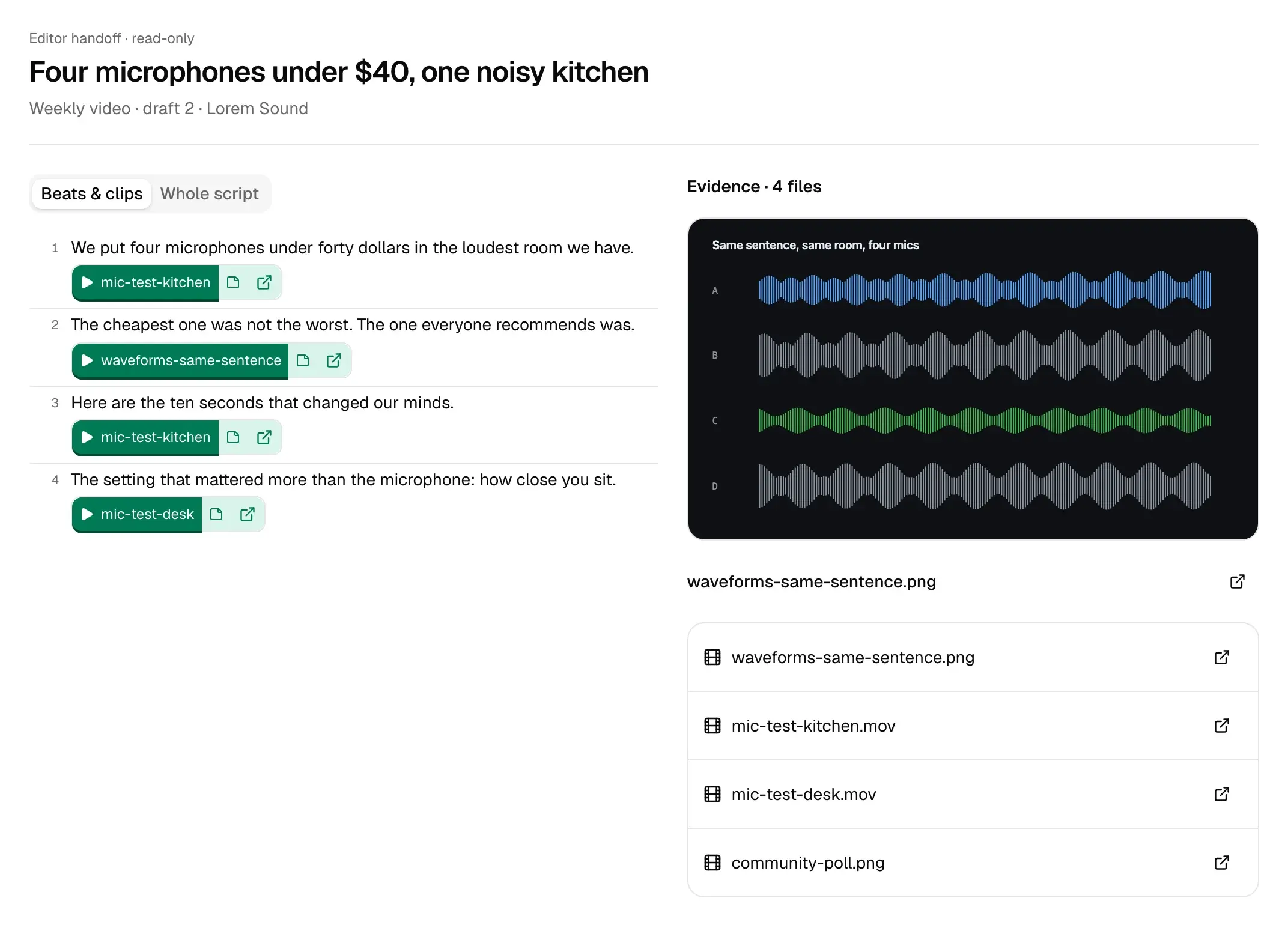
The files reach your editor on Monday. The reasons stay in your head, and rounds two and three are spent getting them out. One week’s brief, item by item, against the draft 2 handoff in Fig. 3.
Today
With ReadyToEdit
Today
With ReadyToEdit
Today
With ReadyToEdit
Today
With ReadyToEdit
Today
With ReadyToEdit
Enclosed
Today2 of 5
With ReadyToEdit5 of 5
While you read the draft
You read the draft with the assistant open beside it. What you tell it is kept with the draft, and every call you make on the page is marked where it happened, so the version your editor opens already carries the reasons.
Draft 1 · weekly video · Lorem Sound
Four microphones under $40, one noisy kitchen
You: leave the poll out. people voting proves nothing about sound.
Your call: rejected the poll
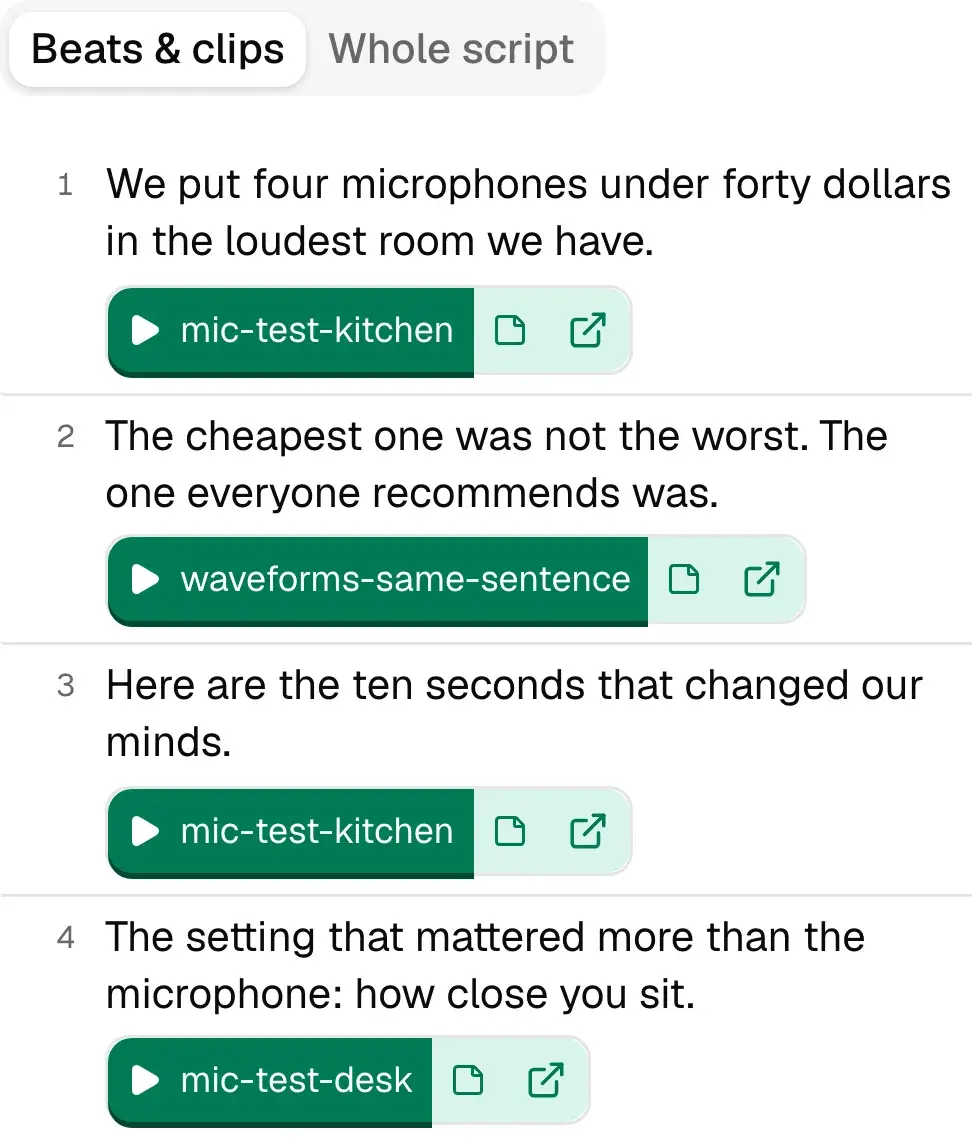
01We put four microphones under forty dollars in the loudest room we have.
You: never call anything ‘the best’. we tested four mics in one kitchen.
Assistant: Noted: say which one held up in this room, and never “best”.
Your call: struck “best”
02The cheapest one was not the worst. (struck: The best budget mic on every list) The one everyone recommends was.
You: find the ten seconds where C beats D
Assistant: mic-test-kitchen.mov 1:12–1:22: same sentence, fan on. D clips on the p’s; C doesn’t.
Your call: kept 1:12–1:22
03Here are the ten seconds that changed our minds.
You: the hand sliding the mic closer is fine as b-roll. the proof is the close-then-far take.
Your call: kept both, labelled
04The setting that mattered more than the microphone: how close you sit.
What they open
One read-only link, and no account to make. Change the draft and update the link: the address stays the same. Revoke it when the video is out.
Inside your workspace
Invite your editor into the workspace, or into one project. They browse the same library you do: every recording, the notes, your past posts. When they would message you — which take, why this order, where you said the number — they ask the assistant and get the file and the timecode.
You: she leads with mic C, not the ranking. is that about the fan noise or the price?
Assistant: Both. Earlier in this chat she said “open on the one that surprised us. the ranking can wait.” C is the surprise: the cheapest of the four, and it held up with the extractor fan on, mic-test-kitchen.mov 1:12.
You: where does she say how close to sit?
Assistant: mic-test-desk.mov 2:25–2:38, the close-then-far comparison. She says it once, at 2:31.
It looks your project up every time it answers, and the answer cites what it used. What it searches:
It has already watched and transcribed your footage, so finding a moment never means rewatching it.
Remember this
Press it under any answer you would give again. It goes to Staging first.
You keep it, or not
In Staging you read what it saved and keep only what is true.
It is searched from then on
The next time anyone asks, a kept note is one of the things it finds.
FutureAnswering your editor the way you would, from everything you have taught it, for the questions you have not answered yet.
Where you decide
Each week the Read proposes angles from what you added, on the cadence you set (Friday afternoon by default). You approve one or dismiss it. Nothing is drafted until you ask.
Approve (chosen)Dismiss
Proposal approved: “The one everyone recommends lost.”
A suggested clip sits beside the line it would go under. Play it, then keep it or reject it. Only the clips you keep are placed in the edit your editor opens.
✓ Keep (chosen)✕ Reject
Kept: mic-test-kitchen.mov · 1:12–1:22
You, or a teammate with a reviewer seat, request changes or approve. Each decision saves a snapshot of the draft, so you can see what changed between rounds. Changed your mind? Reopen it.
Request changesApprove (chosen)
Draft 2 approved, Tue 11:47, with its snapshot.
Revision memory
Some corrections you make every week: cut the hype, lose the exclamation marks, write your own opening. Make the same one across drafts and it carries into the next draft, and is listed on a screen called What I’ve learned, in sentences like these.
“You cut the marketing words out of what I write.”
You rewrote the sales language in “Four microphones under $40, one noisy kitchen”.
“You’d rather state a thing than exclaim it.”
“My openings do not survive. You write your own.”
“You take the emoji out.”
ExampleThe sentences as What I’ve learned prints them.
Before you connect anything
$20/month
About one half-hour recording a month (750 credits), one project, one reviewer seat.
$40/month
About 4 half-hour recordings a month (2,000 credits), one project, up to 2 reviewer seats.
Several recordings a week
$149/month
About 18 half-hour recordings a month (9,000 credits), up to 3 projects, up to 5 reviewer seats.
$299/month
About 41 half-hour recordings a month (20,000 credits), up to 10 projects, up to 15 reviewer seats.
Free while billing is being set up. We will email before the first charge. The reserve link tells us which price you would pay; no card, no charge.
Connect the Drive folder you already send, tell the assistant what the video is and what it must never say, and read the draft it prepares.